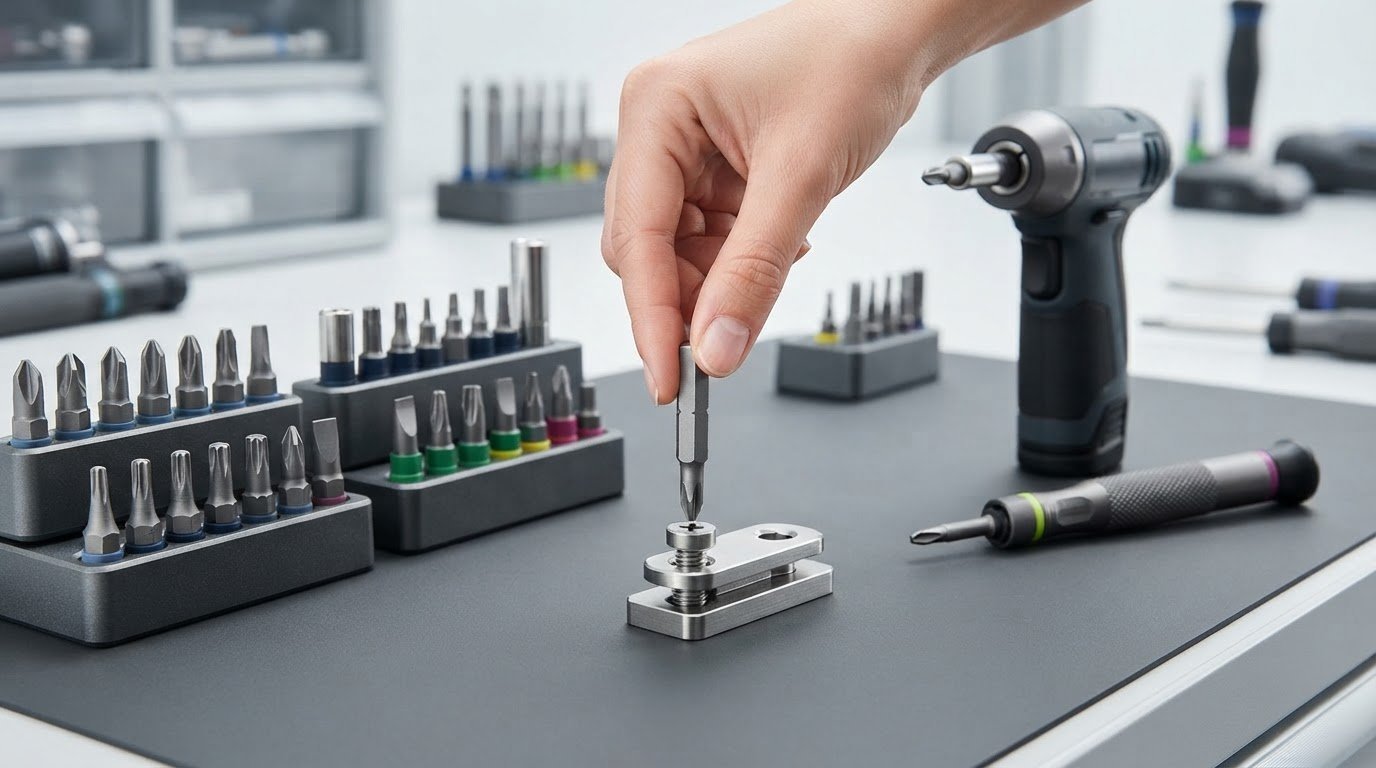
Could the bit that looks right be the wrong one for the job? Phillips, Pozidriv, and Frearson heads can look alike, but a mismatch may slip and damage the screw. If you’ve paused over confusing bit markings or tried to force a loose fit, you’re not alone. Learning how to choose the right screwdriver bit for a screw starts with identifying the drive, not guessing from appearance.
This guide covers the practical checks: recognize the screw-head profile, match the bit size, and test that it seats securely with minimal play before fastening. You’ll also learn when a manual driver or drill is suitable, why an impact driver calls for an impact-rated bit, and how bit length affects access and control. For projects that call for a range of bits, the DeWALT FLEXTORQ Bit Set is one option to consider.
Key Takeaways
- Start with a clean screw recess, then use its visible shape to identify the drive type.
- Check both the drive profile and bit size before fastening.
- Consider the bit’s construction and tool rating separately from its drive shape.
- Test the fit by hand, then drive cautiously to help avoid slipping or damaging the screw head.
- Choose a bit set around the screw profiles and sizes you use most, whether for occasional fixes or regular fastening work.
Why choosing the right screwdriver bit for a screw matters
A bit that slips or wobbles can turn a simple fastening job into a frustrating one. You may need to reposition it repeatedly, press harder, or stop to deal with a damaged screw. A proper match means fitting both the screw’s drive shape and its size, so the bit engages securely instead of catching on only a few edges.
A properly seated bit fills the screw’s drive recess, sits straight, and stays steady when you turn it. Check for that fit before applying force. A familiar-looking profile isn’t proof of compatibility. Phillips and Pozidriv drives, for example, both have a cross shape, but their details differ. A bit that seems close can still rock or make contact in the wrong places.
Good contact transfers turning force from the bit into the screw. With a poor fit, the bit may slip out, or cam out, as you apply torque. Repeated slipping can round the edges of the screw recess and wear the bit tip. If the tool jumps, it can also scratch or dent the work surface. Pause and reassess instead of pushing harder.
What a secure bit-to-screw fit looks and feels like
Check the screw recess, then place the bit tip into it without turning. The tip should reach into the drive and contact its intended surfaces, not perch on the rim. Hold the driver in line with the screw. A suitable bit sits straight and has no obvious side-to-side movement when you gently test it by hand.
Firm seating doesn’t require force. If the tip won’t settle, or you need to push hard to make it seem snug, remove it and compare another size or drive profile. For example, if a cross-shaped bit rocks in the recess, try the correct matching profile rather than relying on pressure to hold it steady.
What happens when the bit is too large or too small
An oversized tip may catch at the entrance but fail to reach the recess fully. It can feel seated while making contact only near the top, leaving little support as you turn. An undersized tip can drop in too far, rock from side to side, or concentrate force on a few edges instead of engaging the drive evenly.
Both mismatches increase the chance of slipping and cam-out. Each slip can wear away the screw’s drive details, making the next attempt harder and reducing the chance that another bit will grip. A rounded or worn recess may no longer give even a correctly sized bit a secure hold. Stop if the bit keeps jumping; inspect the head and reassess the fit before continuing.
Choosing the right screwdriver bit for a screw means checking the contact, not just matching a quick glance at the head. A careful hand test takes little time and helps protect the screw, bit, and workpiece before fastening begins.
Identify the screw drive type and find the matching bit size
Start with the screw head, not the tool you happen to have nearby. The recess shape indicates the drive type; the size marking helps you choose which scale of bit to try. Both must match. A cross-shaped recess, for instance, narrows the choice but doesn’t tell you whether the screw takes Phillips or another cross-drive profile.
Recognize common screw-drive shapes
Wipe away dirt and look straight into the recess. Use this guide to narrow down the profile before comparing bit sizes.
| Visible recess | Drive type | What to look for |
|---|---|---|
| Cross-shaped | Phillips | Four main arms radiate from the center. |
| Straight groove | Slotted | One straight slot crosses the screw head. |
| Square | Robertson or square | A four-sided recess with straight walls. |
| Six-point star | Torx | A star-shaped recess with six rounded lobes. |
| Six-sided | Hex | A recessed hexagon, also called an Allen drive. |
Some cross-drive screws are JIS rather than Phillips. They look similar, but use distinct drive standards, so appearance alone may not settle the match. Specialty and security drives may also have a center pin, extra notches, or other features. Identify the screw head itself instead of guessing from the material or task. iFixit’s How to Choose the Right Screwdriver Bit guide also covers common identification pitfalls, including Phillips versus JIS.
Read bit markings and narrow down the size
After identifying the profile, check the bit markings. Phillips bits commonly use “PH” followed by a number, such as PH1, PH2, or PH3. PH2 is a common general-purpose size, but that doesn’t make it right for every Phillips screw. Other drive types use their own marking conventions, and sizes aren’t interchangeable across profiles.
The drive profile tells you the bit’s shape; the size marking tells you its scale. Treat labels as a starting point, not a guarantee that a particular bit fits every screw of that type. A labeled set makes it easier to compare neighboring sizes. Select a likely candidate, place it into the recess, and compare it with another size if it doesn’t sit squarely. The practical process is simple: identify the profile, then confirm the size against the actual recess.
If you’re building a selection around the profiles you use most, the DeWALT FLEXTORQ Bit Set is one bit-set option to consider.
Compare screwdriver bit types, lengths, and power-tool suitability
Once you’ve identified the drive profile and size, choose a bit that suits the tool and the space around the fastener. These are separate decisions: Phillips describes the tip shape, while standard or impact-rated describes the bit’s intended tool use. The tip still has to fit the screw, whichever driver you use.
| Tool | Suitable bit choice | Best suited to |
|---|---|---|
| Manual screwdriver | A bit or driver tip that matches the screw profile and size | Controlled turning, careful starts, and smaller fastening jobs |
| Drill driver | A compatible standard bit; an impact-rated bit can also be used | Repeated fastening where powered speed is useful |
| Impact driver | A bit rated for impact-driver use | High-torque driving with a compatible impact-rated bit |
Check the tool and bit makers’ compatibility guidance, especially before using a powered tool. An impact driver delivers repeated high-torque blows. Standard bits aren’t designed for that loading and may break, so use an impact-rated bit instead. Some impact-rated bits include a torsion zone, a section designed to flex and absorb some of the shock. That design doesn’t guarantee a bit will last longer in every task, so match the bit to the application and use it as directed.
Choose a standard, impact-rated, or torsion bit
For hand use or a drill driver, choose a standard bit when its markings and maker’s guidance suit the job. For an impact driver, select an impact-rated bit. A torsion zone is a construction feature, not a drive profile: it doesn’t change whether the tip is Phillips, Torx, or another shape. Match the profile and size to the screw first, then confirm that the bit is suitable for the tool.
Match bit length and holding features to the task
Short bits are useful in tight spaces and can feel easier to control because there’s less length between the tool and screw. A longer bit or extension can reach a fastener set inside a recess or behind an obstruction, but added length may flex more and make it harder to keep the tip aligned. Use only the reach you need, and make sure the bit still seats properly before driving.
Magnetic tips or holders can help keep a screw in place, especially when working in an awkward position or with one hand. They’re a handling aid, not a fix for poor fit. If the bit wobbles or slips, magnetic retention won’t correct a mismatched profile or size. For a bit-set option to consider for fastening tasks, see the DeWALT FLEXTORQ Bit Set.
Choosing the right screwdriver bit for a screw involves checking three things: tip profile and size, tool rating, and the reach needed for the work. Choose each deliberately, then start with controlled pressure rather than forcing the fastener.
Use this step-by-step test to confirm the screwdriver bit fits
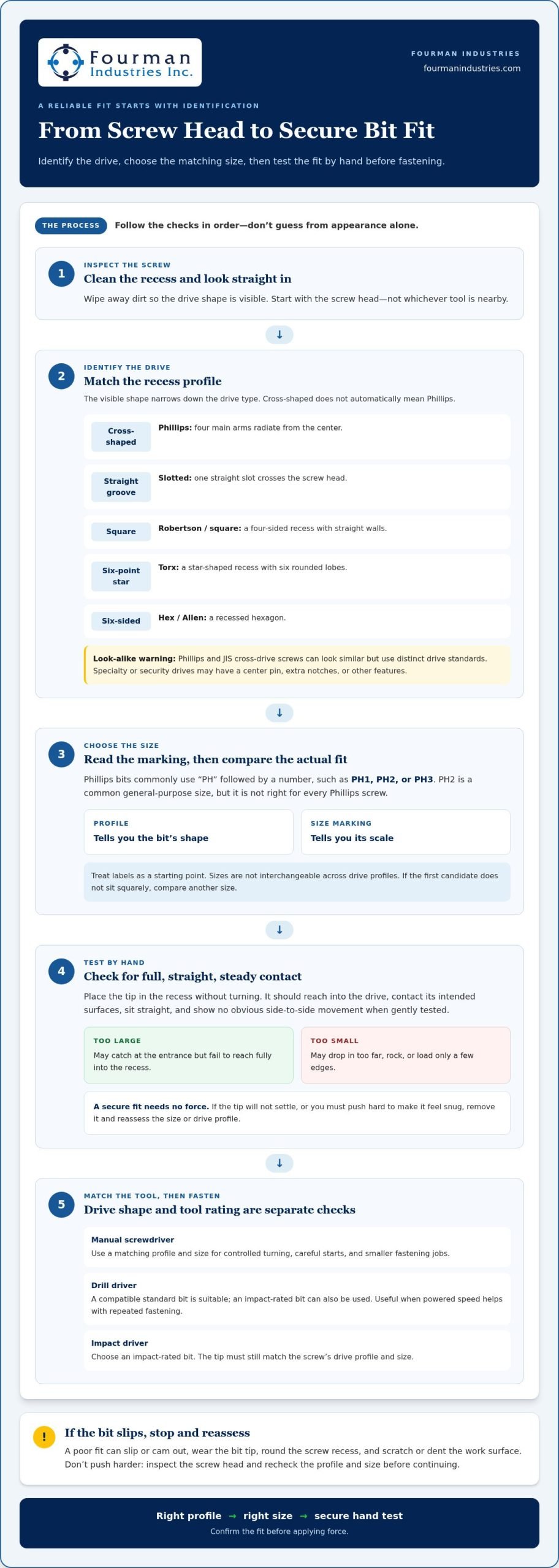
A quick hands-on check can catch a mismatch before it damages a screw or interrupts the job. Set the drill or impact driver aside until the bit sits securely by hand. Work through these checks in order:
- Inspect the screw. Clear dust, paint, or debris from the recess so it doesn’t hide the drive shape or block the bit. Look for worn, rounded, or damaged edges that could affect the fit.
- Identify the drive type. Check the recess itself, not the material or task. Distinguish the profile carefully, especially when two shapes look similar.
- Compare candidate sizes. Use the bit markings to narrow the options, then compare likely sizes directly with the recess. Don’t assume the first bit with the right profile is the right size.
- Hand-test the bit. Hold it straight and insert it without turning. It should reach into the recess and sit steadily, without obvious side-to-side movement. Don’t force a tip that won’t seat.
- Drive cautiously. Once the manual test feels secure, align the tool with the screw and start slowly. Use controlled pressure and stop if the bit slips repeatedly.
Before applying power, make sure the bit sits straight, reaches the recess, and doesn’t rock when tested by hand. If anything feels loose, reassess the drive type and size instead of trying to compensate with extra force.
Check engagement by hand before using a power tool
Insert the bit straight into the cleaned recess and check that it reaches fully. Apply light hand pressure, then gently test for movement without turning the screw. The bit should stay aligned rather than tilt or rock. If it doesn’t seat or feels loose, compare the next closest size in the same drive profile. Never press hard to make a questionable match feel secure.
Drive with control and stop if the bit slips
With the fit confirmed, keep the tool in line with the screw’s axis and begin at low speed. Apply steady, controlled pressure rather than leaning hard. If the bit slips more than once, stop instead of making another attempt under power. Remove the bit and inspect both surfaces: check the screw recess for rounded or worn edges and the bit for visible wear or damage.
Persistent wobble is a signal to stop and reassess. It may point to the wrong size or a drive profile that only looks similar. Recheck the recess and test a suitable alternative by hand before driving again. Treating the fit test as part of the job helps you choose the right screwdriver bit for a screw before fastening begins.
For a bit-set option to use across fastening tasks, explore the DeWALT FLEXTORQ Bit Set.
Choose a screwdriver bit set that fits your work
A useful bit set covers the fasteners you actually encounter, not simply the one with the most pieces. Think about the furniture, fixtures, equipment, or materials you work with regularly. Note the drive profiles and bit sizes those jobs call for, then use that list to compare sets. This helps you choose a practical range instead of adding specialty profiles that may stay unused.
Build a set around the fasteners you actually use
For occasional household repairs, prioritize common profiles and sizes you’re likely to need, with clear markings that make selection straightforward. If fastening is frequent or part of professional work, consider whether the set covers the range of screws you regularly handle and suits your tools. In either case, check that its bits match your manual or power-tool use and provide the reach your typical jobs require.
Use this short checklist as you compare:
- Profile coverage: Look for the drive types found in your regular projects.
- Size range: Check for useful options within those profiles instead of relying on piece count alone.
- Clear markings: Choose labeling that helps you identify profiles and sizes without guesswork.
- Tool compatibility: Consider whether you’ll use the bits by hand, in a drill driver, or in an impact driver, and match the bit rating to the tool.
- Access needs: Think about whether your work calls for shorter bits, added reach, or a way to keep screws in place while positioning them.
Don’t choose specialty profiles just because they’re included. Add them when you regularly encounter fasteners that need them. A well-organized set with clearly marked bits can save time, but its selection still needs to match the screws in your work.
When a DeWALT FLEXTORQ Bit Set may suit the job
If you’re comparing bit-set options for fastening tasks, the DeWALT FLEXTORQ Bit Set is a screwdriver-bit set offered by Fourman Industries. Use the same practical criteria: choose around the profiles and sizes you use, and consider how the bits will work with your tools. The product name alone doesn’t replace checking which bits suit a particular screw and application.
Start with the fasteners you encounter most, then explore screwdriver-bit options in the store. That way, your choice is guided by the work ahead, not by extras you won’t use.
Choosing the right screwdriver bit for a screw also helps you choose a useful set: focus on drive profiles, size coverage, clear markings, and tool compatibility. A considered selection keeps the bits relevant to your jobs and easier to identify when it’s time to fasten.
Put the right bit to work on your next project
Before your next fastening job, note the screw profiles and sizes you use most. That short list can guide your bit-set choice and make it easier to find a match when work is underway. Keep the fit check in your routine, too. A few seconds spent assessing a bit can help you avoid a frustrating stop later.
Fourman Industries offers the DeWALT FLEXTORQ Bit Set for fastening tasks. Use what you’ve learned about how to choose the right screwdriver bit for a screw to consider which option suits your regular work, focusing on the profiles and sizes you need.
Explore screwdriver bit options from Fourman Industries and choose a bit set with your next project in mind. A well-matched bit helps you fasten with more confidence, one screw at a time.
Frequently Asked Questions
How do I know which screwdriver bit fits a screw?
Identify the recess shape, then compare bits made for that drive. The right candidate should reach into the recess and stay steady when held straight. To choose the right bit, check the actual fastener rather than relying on what’s common for a particular project. Furniture kits, for example, may include different drive types, so test the screw in front of you before picking up a power tool.
What happens if I use the wrong screwdriver bit?
A mismatched bit can slip, wear its own tip, damage the screw recess, or scratch the material around the fastener. It may also make later removal more difficult, especially if the recess becomes rounded. Stop after repeated slipping and inspect both the screw and bit under good light. Don’t push harder to compensate. If the screw is already damaged, avoid further powered attempts that could make the recess harder to grip.
Can I use a Phillips bit on a JIS screw?
A Phillips bit may not fit a JIS screw correctly because the two cross-drive standards have different geometry. Their similar appearance can make a mismatch hard to spot at a glance. If the fastener’s standard matters, consult its markings or relevant tool guidance instead of assuming its origin identifies the drive. If the bit doesn’t engage securely, stop and choose one designed for the identified profile rather than forcing it.
How do I choose the right Phillips bit size?
Start with a Phillips bit, then compare available sizes with the screw head to find one that engages without rocking. Markings such as PH1 and PH2 help distinguish sizes, but the label is only a guide. A PH2 may suit a common general-purpose screw, yet another screw may need a different size. Test the candidate manually, particularly before powered driving or working with a fastener that’s difficult to replace.
Is an impact-rated screwdriver bit necessary for an impact driver?
Use a bit rated for the impact driver and the application. Impact drivers deliver repeated force, so a standard bit shouldn’t be treated as interchangeable with an impact-rated one. Check the bit manufacturer’s instructions and your tool’s requirements before use. Then check the tip against the screw: an impact rating concerns tool suitability, not drive-profile compatibility. The wrong tip shape or size can still slip, even with a properly rated bit.
Why does my screwdriver bit keep slipping out of the screw?
Slipping may point to a mismatched drive type or size, debris in the recess, poor alignment, or wear on the screw or bit. Stop and look closely at both surfaces. A bit can appear to fit while worn edges prevent it from engaging properly. Clear any debris, realign the driver with the screw, and test another suitable bit by hand. If the screw recess is badly rounded, repeated attempts may worsen it.